Capacitor 4から、 Capacitor 5へのアップデートを行う。
以前のアップグレードに比べ、Capacitor 4と5の間のブレークチェンジは極めて少ないです。このガイドでは、プロジェクトを現在のCapacitor 5のバージョンにアップデートする手順と、公式プラグインのブレークチェンジのリストをご紹介しています。
NodeJS 16+
Node 12はサポート終了しました。Node 14は2023年4月30日にサポート終了を迎えます。Capacitor 5は、NodeJS 16以上が必要です。(最新のLTSバージョンを推奨します)。
CLIを使った移行方法
Capacitor CLI の latest-5 バージョンをプロジェクトにインストールします:
npm i -D @capacitor/cli@latest-5
インストールしたら、以下を実行するだけで、CLIがマイグレーションを処理してくれます。
npx cap migrate
マイグレーションのステップのいずれかが完了できない場合は、ターミナルの出力で追加情報が利用できるようになります。手動でマイグレーションを行うための手順を以下に示します
VS Code Extensionを使用したマイグレーション
VS Codeエクステンションがインストールされている場合、エクステンションのrecomendationsセクションをチェックして、プロジェクトをCapacitor 5に移行するオプションを見つけるだけです。
iOS
以下のガイドは、Capacitor 4 iOSプロジェクトをCapacitor 5にアップグレードする方法について説明しています。
Xcodeをアップグレードする
Capacitor 5はXcode 14.1+が必要です。
.gitignoreを更新する
.gitignoreファイルを以下のように変更します:
- App/Podfile.lock
+ App/output
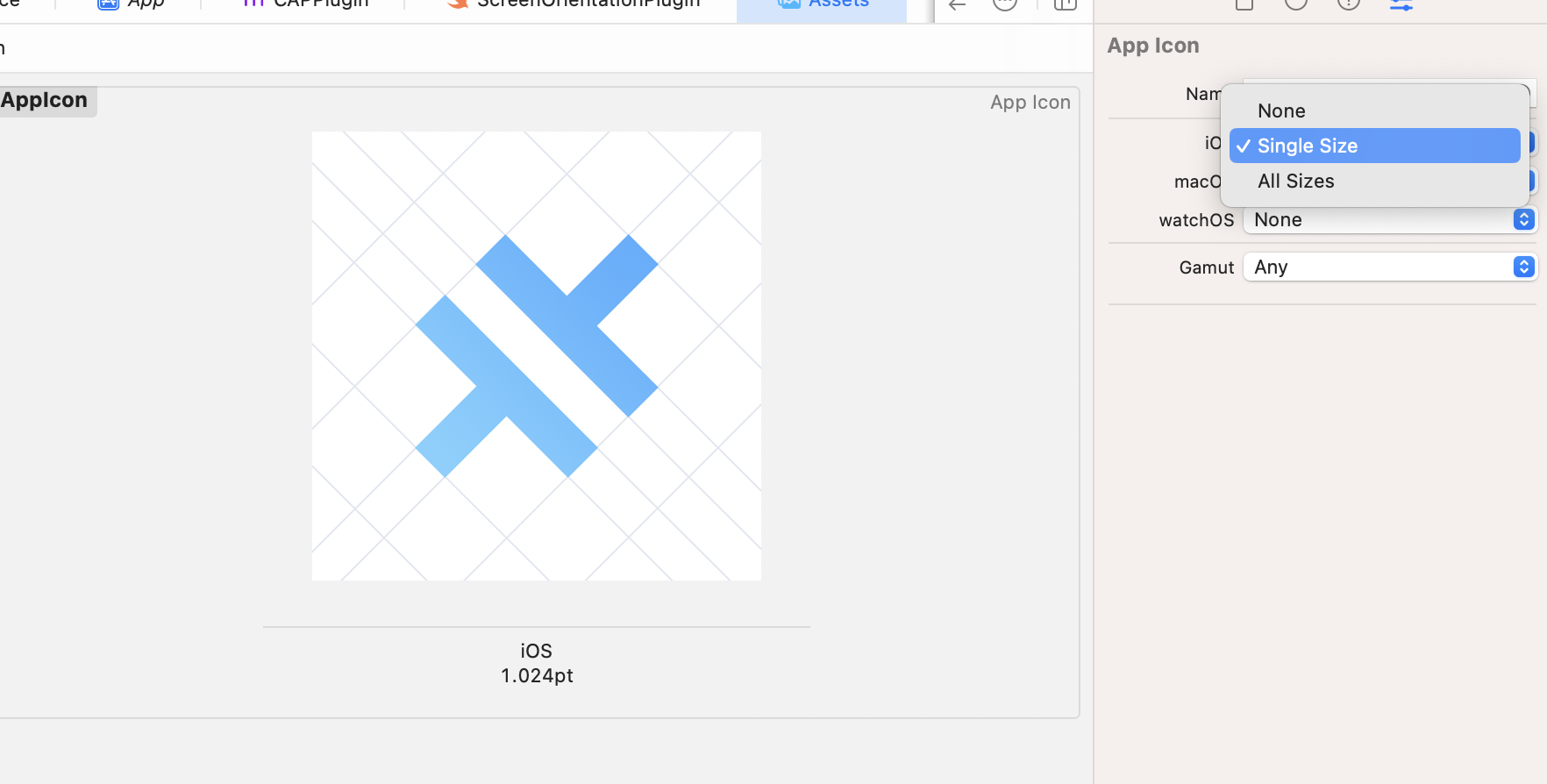
1つのアプリアイコンを使用するようにアセットを更新する
Xcode 14は1024x1024の単一のアプリアイコンをサポートしているので、不要なサイズをすべて削除してAppIcon.appiconsetをきれいにすることができます。
Android
以下のガイドでは、Capacitor 4のAndroidプロジェクトをCapacitor 5にアップグレードする方法について説明しています。
Android Studioをアップグレードする
Capacitor 5では、Java JDK 17を必要とするGradle 8を使用するため、Android Studio Flamingo | 2022.2.1またはそれ以降が必要です。Java 17は、Android Studio Flamingoに同梱されています。追加のダウンロードは必要ありません!
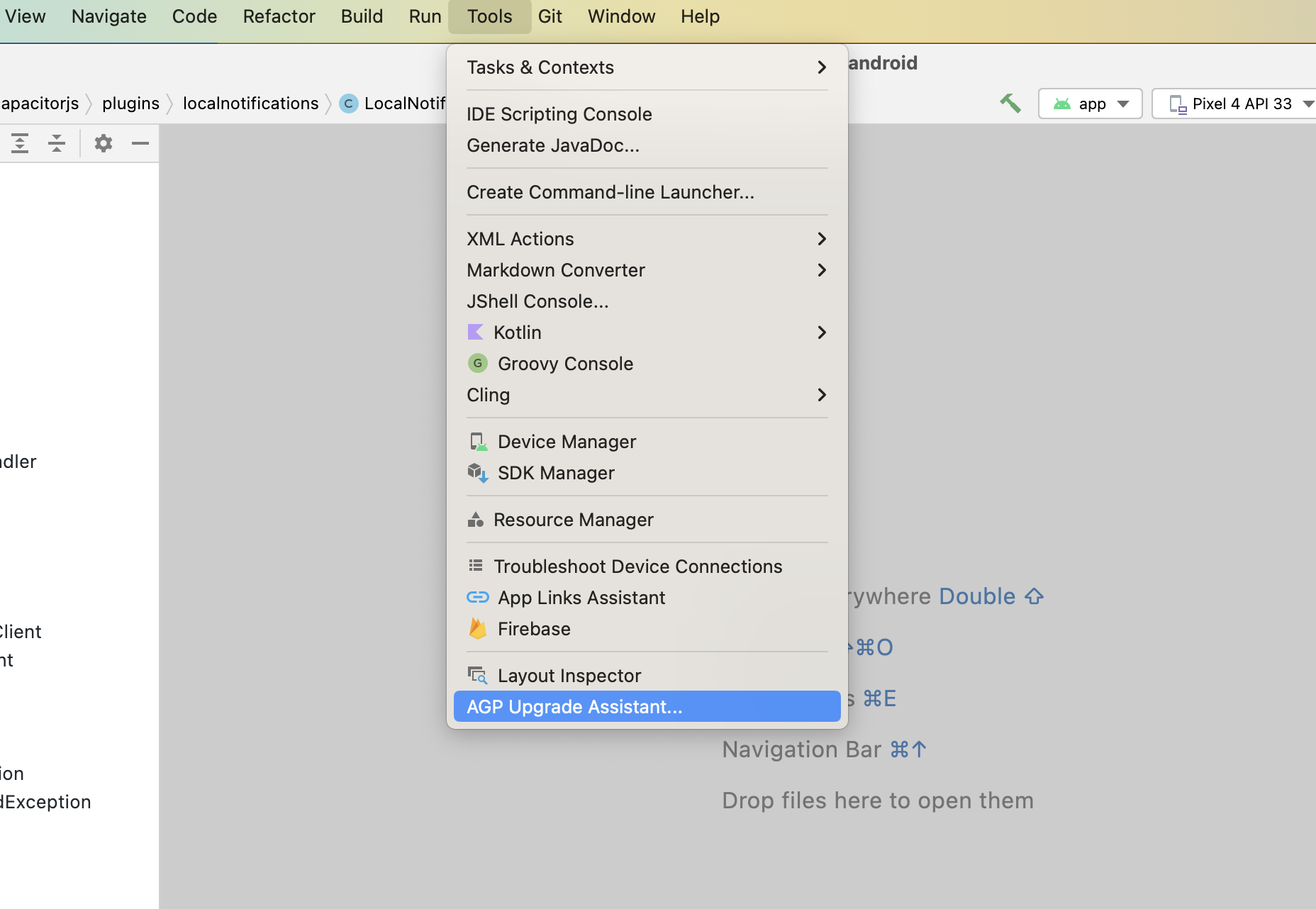
Android Studioがアップデートされると、gradleに関連するいくつかのアップデートと、パッケージをビルドファイルに移動することを支援することができます。 まず、Tools -> AGP Upgrade Assistant を実行します。
Androidプロジェクトの変数を更新
variables.gradleファイルで、以下の新しいmin値に値を更新してください。
minSdkVersion = 22
compileSdkVersion = 33
targetSdkVersion = 33
androidxActivityVersion = '1.7.0'
androidxAppCompatVersion = '1.6.1'
androidxCoordinatorLayoutVersion = '1.2.0'
androidxCoreVersion = '1.10.0'
androidxFragmentVersion = '1.5.6'
coreSplashScreenVersion = '1.0.0'
androidxWebkitVersion = '1.6.1'
junitVersion = '4.13.2'
androidxJunitVersion = '1.1.5'
androidxEspressoCoreVersion = '3.5.1'
cordovaAndroidVersion = '10.1.1'
Google Servicesのアップデート
# build.gradle

    dependencies {
-       classpath 'com.google.gms:google-services:4.3.13'
+       classpath 'com.google.gms:google-services:4.3.15'
gradle plugin を 8.0.0 にアップデート
# build.gradle

    dependencies {
-       classpath 'com.android.tools.build:gradle:7.2.1'
+       classpath 'com.android.tools.build:gradle:8.0.0'
gradle wrapper を 8.0.2にアップデート
# gradle-wrapper.properties

distributionBase=GRADLE_USER_HOME
distributionPath=wrapper/dists
- distributionUrl=https\://services.gradle.org/distributions/gradle-7.4.2-all.zip
+ distributionUrl=https\://services.gradle.org/distributions/gradle-8.0.2-all.zip
zipStoreBase=GRADLE_USER_HOME
zipStorePath=wrapper/dists
Jetifier を無効化
If you don't have any plugin that still uses old android support libraries instead of their equivalent AndroidX libraries remove this line.
# gradle.properties

# Android operating system, and which are packaged with your app's APK
# https://developer.android.com/topic/libraries/support-library/androidx-rn
android.useAndroidX=true
- # Automatically convert third-party libraries to use AndroidX
- android.enableJetifier=true
パッケージを build.gradle に移動
# AndroidManifest.xml

<?xml version="1.0" encoding="utf-8"?>
- <manifest xmlns:android="http://schemas.android.com/apk/res/android"
-     package="[YOUR_PACKAGE_ID]">
+ <manifest xmlns:android="http://schemas.android.com/apk/res/android">
# build.gradle

android {
+     namespace "[YOUR_PACKAGE_ID]"
      compileSdkVersion rootProject.ext.compileSdkVersion
androidScheme のアップデート
Capacitor 6 では、Capacitor アプリケーションがシステムの オートフィル機能 を利用できるようにするため、既存のアプリケーションの androidScheme のデフォルト設定を https とする予定です。
スキームを変更することは、アプリケーションを別のドメインで出荷することと同じであり、Cookieやlocalstorageなどに保存されたデータにはアクセスできなくなります。この変更によるデータ損失を避けるため、Capacitor設定ファイルでは、スキームを現在のデフォルトであってもhttpに設定してください。
{
  server: {
    androidScheme: "http"
  }
}
kotlin バージョンのアップデート
kotlin を使用している場合は、kotlin_version 変数を '1.8.20' に更新してください。
プラグイン
以下のプラグインの機能が変更または削除されました。それに合わせてコードを更新してください。
Action Sheet
androidxMaterialVersionvariable has been updated to1.8.0.
Browser
androidxBrowserVersionvariable has been updated to1.5.0.
Camera
- Android 13 requires to declare read media images permission (
<uses-permission android:name="android.permission.READ_MEDIA_IMAGES"/>) inAndroidManifest.xml. androidxMaterialVersionvariable has been updated to1.8.0.androidxExifInterfaceVersionvariable has been updated to1.3.6.
Device
DeviceId.uuidchanged toDeviceId.identifier- On iOS 16+,
DeviceInfo.namewill return a generic device name unless you add the appropriate entitlements.
Geolocation
playServicesLocationVersionhas been updated to21.0.1.
Google Maps
googleMapsPlayServicesVersionhas been updated to18.1.0.googleMapsUtilsVersionhas been updated to3.4.0.googleMapsKtxVersionhas been updated to3.4.0.googleMapsUtilsKtxVersionhas been updated to3.4.0.kotlinxCoroutinesVersionhas been updated to1.6.4.androidxCoreKTXVersionhas been updated to1.10.0.kotlin_versionhas been updated to1.8.20.
Local Notifications
- Android 13 requires a new runtime permission check in order to schedule local notifications. You are required to call
checkPermissions()andrequestPermissions()accordingly, when targeting SDK 33.
Push Notifications
- Android 13 requires a new runtime permission check in order to receive push notifications. You are required to call
checkPermissions()andrequestPermissions()accordingly, when targeting SDK 33. firebaseMessagingVersionvariable has been updated to23.1.2.
Status Bar
- On iOS, the default status bar animation has been changed to
FADE.