Updating from Capacitor 7 to Capacitor 8
In this guide, you'll find steps to update your project to the current Capacitor 8 version as well as a list of breaking changes for our official plugins.
Breaking changes in Capacitor config file
appendUserAgent had a bug on iOS that appended two whitespaces before appending the user agent and has been fixed. If you want to prevent the user agent change, add an extra whitespace on ios.appendUserAgent. Don't do it on the root appendUserAgent as it will also add the whitespace on Android.
android.adjustMarginsForEdgeToEdge has been removed in favor of our new System Bars core plugin, which will handle edge to edge issues in modern Android.
In brief, margins handling has been removed in favor of using env / CSS variables for handling edge to edge. Read here for more information and details on how to implement in your application.
Breaking changes in @capacitor/cli
Capacitor CLI now creates iOS SPM projects as default.
While it doesn't affect existing apps, if you remove the ios folder and run npx cap add ios again, it will be created using the SPM template, if you want to use the CocoaPods template, run npx cap add ios --packagemanager CocoaPods instead.
Breaking changes in @capacitor/android
bridge_layout_main.xml file has been removed, if you were referencing it in your app code or in plugin code, use capacitor_bridge_layout_main.xml instead.
Breaking changes in @capacitor/ios
Capacitor now emits CAPBridgeViewController's notifications for viewDidAppear and for viewWillTransition, if you're using CAPBridgeViewController extensions to emit those events you should remove them.
NodeJS 22+
Capacitor 8 requires NodeJS 22 or greater. (Latest LTS version is recommended.)
Using the CLI to Migrate
Install the latest version of the Capacitor CLI to your project:
npm i -D @capacitor/cli@latest
Once installed, simply run the following to have the CLI handle the migration for you.
npx cap migrate
If any of the steps for the migration are not able to be completed, additional information will be made available in the output in the terminal. The steps for doing the migration manually are listed out below.
iOS
The following guide describes how to upgrade your Capacitor 7 iOS project to Capacitor 8.
Upgrade Xcode
Capacitor 8 requires Xcode 26.0+.
Raise iOS Deployment Target
Do the following for your Xcode project: select the Project within the project editor and open the Build Settings tab. Under the Deployment section, change iOS Deployment Target to iOS 15.0. Repeat the same steps for any app Targets.
Then, if the project is using CocoaPods, open ios/App/Podfile and update the iOS version to 15.0:
platform :ios, '15.0'
Android
The following guide describes how to upgrade your Capacitor 7 Android project to Capacitor 8.
Upgrade Android Studio
Capacitor 8 requires Android Studio Otter | 2025.2.1 or newer.
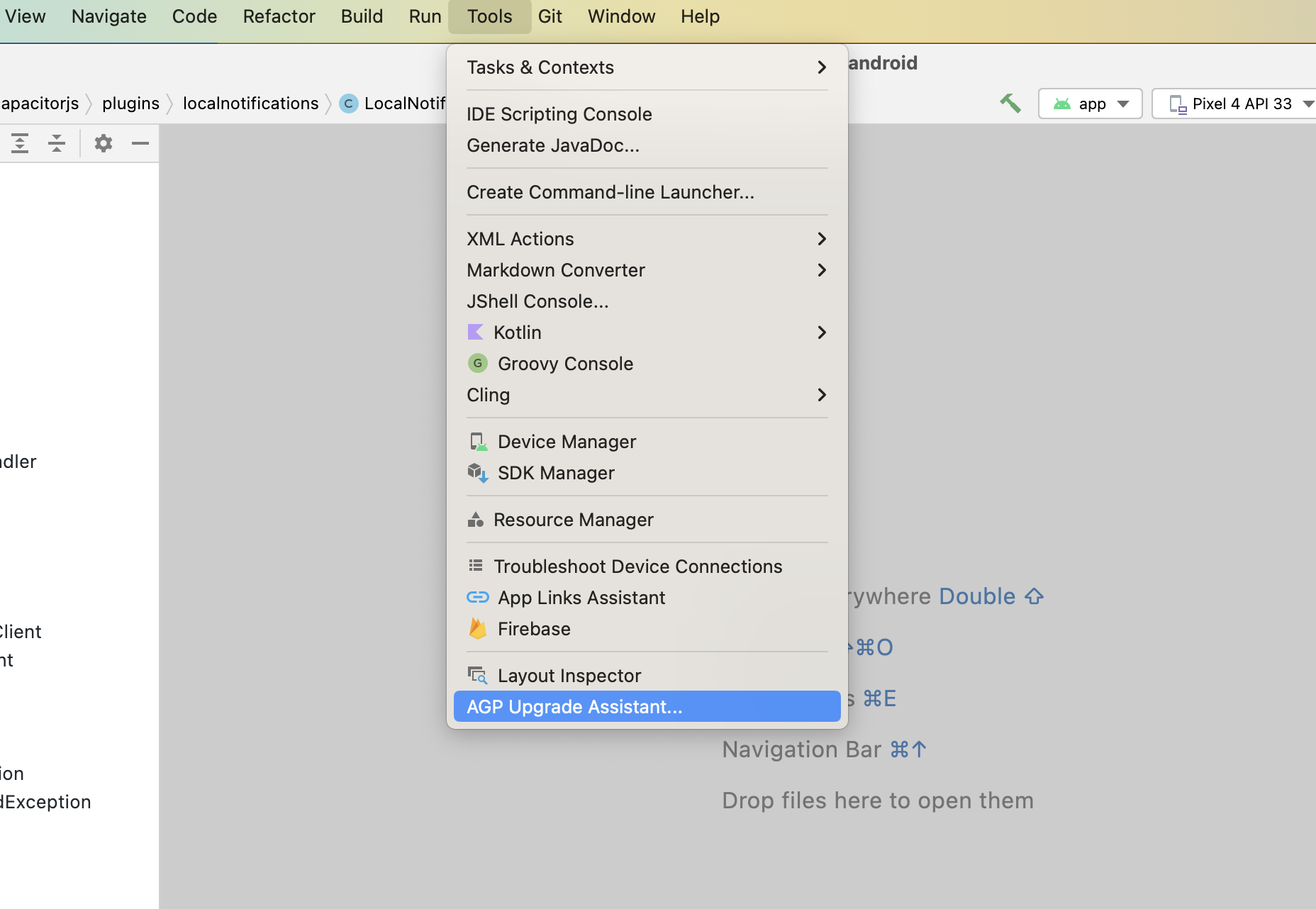
Once it's updated, Android Studio can assist with some of the updates related to gradle. To start, run Tools -> AGP Upgrade Assistant and choose 8.13.0 as the version to update on dropdown. Then click Run selected steps.
Update Android Project Variables
In your variables.gradle file, update your values to the following new minimums
minSdkVersion = 24
compileSdkVersion = 36
targetSdkVersion = 36
androidxActivityVersion = '1.11.0'
androidxAppCompatVersion = '1.7.1'
androidxCoordinatorLayoutVersion = '1.3.0'
androidxCoreVersion = '1.17.0'
androidxFragmentVersion = '1.8.9'
coreSplashScreenVersion = '1.2.0'
androidxWebkitVersion = '1.14.0'
junitVersion = '4.13.2'
androidxJunitVersion = '1.3.0'
androidxEspressoCoreVersion = '3.7.0'
cordovaAndroidVersion = '14.0.1'
Replace deprecated Gradle property name syntax
Gradle has deprecated the property name syntax and now recommends using an = before the value. While it only causes warnings at the moment, it will break in the future.
# app/build.gradle
android {
-    namespace "com.getcapacitor.myapp"
-    compileSdk rootProject.ext.compileSdkVersion
+    namespace = "com.getcapacitor.myapp"
+    compileSdk = rootProject.ext.compileSdkVersion
...
     defaultConfig {
...
         aaptOptions {
-            ignoreAssetsPattern '!.svn:!.git:!.ds_store:!*.scc:.*:!CVS:!thumbs.db:!picasa.ini:!*~'
+            ignoreAssetsPattern = '!.svn:!.git:!.ds_store:!*.scc:.*:!CVS:!thumbs.db:!picasa.ini:!*~'
Update google services plugin
# build.gradle

    dependencies {
        classpath 'com.android.tools.build:gradle:8.7.2'
-       classpath 'com.google.gms:google-services:4.4.2'
+       classpath 'com.google.gms:google-services:4.4.4'
Update gradle plugin to 8.13.0
# build.gradle

    dependencies {
-       classpath 'com.android.tools.build:gradle:8.7.2'
+       classpath 'com.android.tools.build:gradle:8.13.0'
Update gradle wrapper to 8.14.3
# gradle-wrapper.properties

distributionBase=GRADLE_USER_HOME
distributionPath=wrapper/dists
- distributionUrl=https\://services.gradle.org/distributions/gradle-8.11.1-all.zip
+ distributionUrl=https\://services.gradle.org/distributions/gradle-8.14.3-all.zip
zipStoreBase=GRADLE_USER_HOME
zipStorePath=wrapper/dists
Update kotlin version
If your project is using kotlin, update the kotlin_version variable to '2.2.20'.
Add density to configChanges
To prevent the webView from being reloaded on app resize, add density to configChanges of the app activity in AndroidManifest.xml.
- android:configChanges="orientation|keyboardHidden|keyboard|screenSize|locale|smallestScreenSize|screenLayout|uiMode|navigation"
+ android:configChanges="orientation|keyboardHidden|keyboard|screenSize|locale|smallestScreenSize|screenLayout|uiMode|navigation|density"
Plugins
Plugins have been updated to version 8.0.0, make sure to update them to use latest version.
The following plugin functionality has been modified or removed. Update your code accordingly.
Action Sheet
androidxMaterialVersionvariable has been updated to1.13.0.
Barcode Scanner
scanOrientation option has no effect for large screens (e.g. tablets) on Android 16 an higher. You may opt-out of this behavior in your app by adding <property android:name="android.window.PROPERTY_COMPAT_ALLOW_RESTRICTED_RESIZABILITY" android:value="true" /> to your AndroidManifest.xml inside <application> or <activity>. Keep in mind though that this opt-out is temporary will no longer work for Android 17. Android discourages setting specific orientations for large screens. Regular Android phones are unaffected by this change. For more information check the Android docs at https://developer.android.com/about/versions/16/behavior-changes-16#adaptive-layouts
Browser
androidxBrowserVersionvariable has been updated to1.9.0.
Camera
androidxExifInterfaceVersionvariable has been updated to1.4.1.androidxMaterialVersionvariable has been updated to1.13.0.
Geolocation
kotlinxCoroutinesVersionvariable has been updated to1.10.2.- The
timeoutproperty now gets applied to all requests on Android on iOS, as opposed to just web andgetCurrentPositionon Android. This aligns with what is documented in the plugin. If you start experiencing timeouts when requesting location in your app, consider using a highertimeoutvalue. ForwatchPositionon Android, you may use theintervalparameter introduced in version 8.0.0.
Google Maps
googleMapsPlayServicesVersionvariable has been updated to19.2.0.googleMapsUtilsVersionvariable has been updated to3.19.1.googleMapsKtxVersionvariable has been updated to5.2.1.googleMapsUtilsKtxVersionvariable has been updated to5.2.1.kotlinxCoroutinesVersionvariable has been updated to1.10.2.androidxCoreKTXVersionvariable has been updated to1.17.0.kotlin_versionvariable has been updated to2.2.20.
Push Notifications
firebaseMessagingVersionvariable has been updated to25.0.1.
Screen Orientation
lock method has no effect for large screens (e.g. tablets) on Android 16 an higher. You may opt-out of this behavior in your app by adding <property android:name="android.window.PROPERTY_COMPAT_ALLOW_RESTRICTED_RESIZABILITY" android:value="true" /> to your AndroidManifest.xml inside <application> or <activity>. Keep in mind though that this opt-out is temporary will no longer work for Android 17. Android discourages setting specific orientations for large screens. Regular Android phones are unaffected by this change. For more information check the Android docs at https://developer.android.com/about/versions/16/behavior-changes-16#adaptive-layouts
Splash Screen
coreSplashScreenVersionvariable has been updated to1.2.0.
Status Bar
Removes the CAPNotifications.swift and CAPBridgeViewController.swift that emitted .capacitorViewDidAppear and .capacitorViewWillTransition events.
You can listen for them from @capacitor/ios.